
What is a VPN? Protect Your Data on Public Wi-Fi & Streaming
Discover how a VPN creates a secure tunnel for your data, masks IPs, and protects you on public Wi-Fi, streaming, gaming, and remote work.
whats vpn for
Ever think your data is hiding in a secret bunker? That’s exactly what the phrase whats vpn for is about. Let’s cut through the jargon and see how a VPN keeps your online life safe, whether you’re on public Wi‑Fi or chasing geo‑blocked shows. It’s a tool that fits a lot of everyday needs.
What’s a VPN?
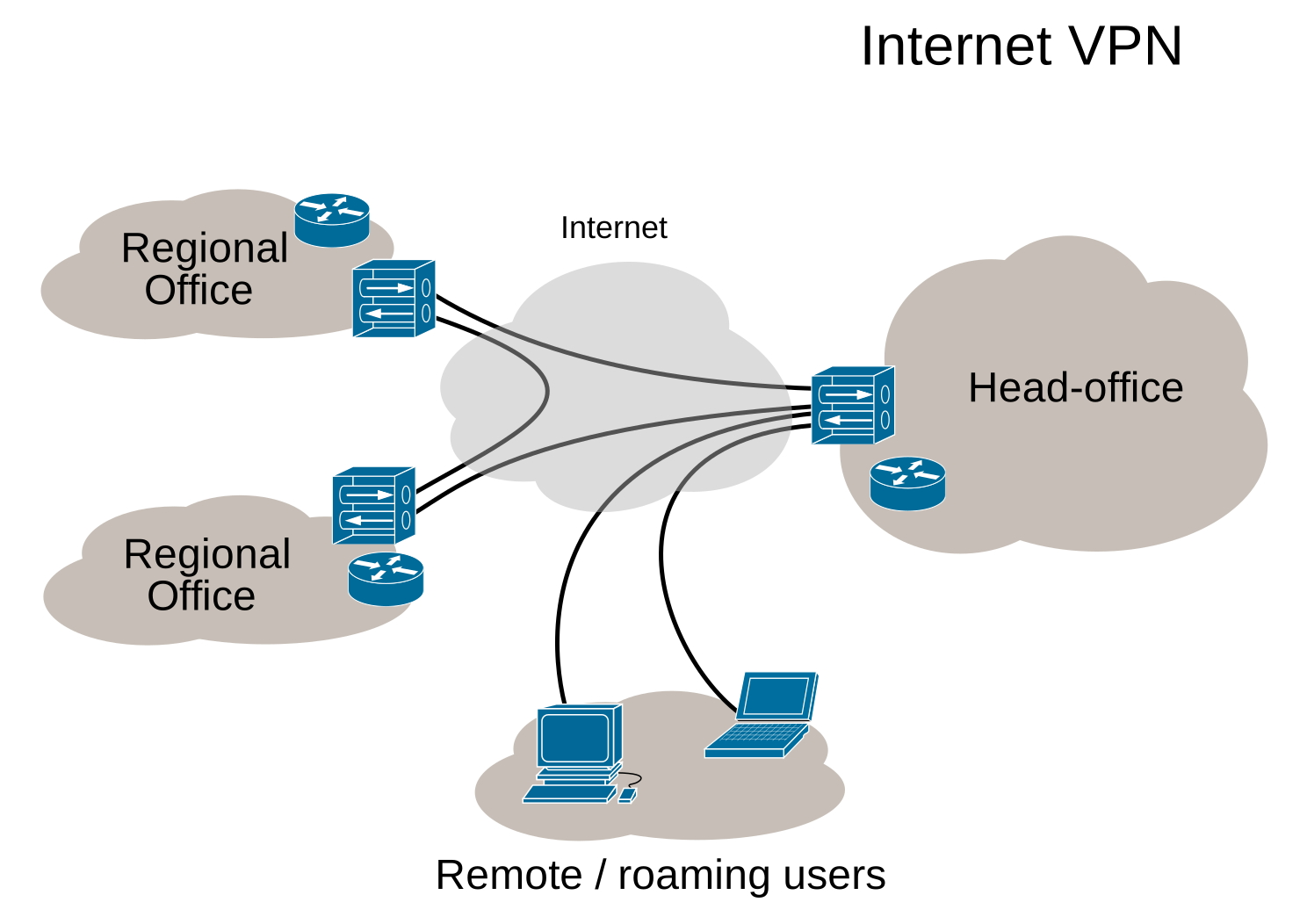
A Virtual Private Network is a secure tunnel that carries your traffic from your device to a remote server, then out to the internet. Picture it as a private highway for your data. The tunnel encrypts everything, so anyone snooping sees only gibberish. It also masks your IP, tricking sites into thinking you’re browsing from another country.
Privacy Benefits
- IP masking hides your real location.
- Encryption scrambles data with AES‑256.
- Reduced metadata leaks – ISPs see less.
Typical Use Cases
Use Case | What It Solves | Example |
|---|---|---|
Streaming | Access geo‑blocked content | US user watches UK‑only series |
Public Wi‑Fi | Prevent hackers | Traveler checks bank on café Wi‑Fi |
Remote work | Secure corporate access | Freelancer pulls client files from home |
Censorship | Bypass restrictions | Journalist in China reads global news |
Gaming | Lower lag, avoid DDoS | Gamer connects to Asian server |
VPN vs Proxy vs TOR
Feature | VPN | Proxy | TOR |
|---|---|---|---|
Speed | Fast, slight overhead | Fastest, no encryption | Slow, multiple hops |
Encryption | Full traffic | Usually none | Multi‑layer |
Anonymity | Good | Poor | Highest |
Use‑Case | Everyday privacy | Quick IP change | High‑risk anonymity |
We’re not just talking; we’re showing you. A student in the U.S. used a VPN to stream a UK‑only series, cutting out hours of waiting for a legal release. A small business owner uses a VPN to connect employees securely, keeping sensitive data away from prying eyes.
Quick Guide to Picking a VPN
- Define purpose – privacy, streaming, gaming, business, budget.
- Check policies – no‑logs, jurisdiction.
- Test with trial – 30‑day refund.
- Look for features – split‑tunneling, DNS leak protection, UDP support.
Why Forest VPN?
Forest VPN pairs reliable tunnels with a price that fits most budgets. With servers in over 30 countries, you can pick a spot that suits your needs—streaming a show, working remotely, or guarding your data on public Wi‑Fi. The app runs on Windows, macOS, iOS, Android, and Linux, and it offers split‑tunneling so you can keep some apps outside the VPN while others stay protected.
Real‑World Testimonials
“I started using Forest VPN to watch my favorite shows from the UK while traveling in the US. The connection was stable, and the setup took less than a minute.” – Maya, 28, Digital Marketer
“As a freelance graphic designer, I need to access client files from anywhere. Forest VPN gives me the peace of mind that my work is secure, and the price is unbeatable.” – Carlos, 34, Freelancer
Practical Usage Tips
- Choose a server close to you to reduce latency.
- Enable DNS leak protection to keep your browsing private.
- Use split‑tunneling if you want to keep certain apps (like a web browser) outside the VPN for speed.
- Keep the app updated to benefit from the latest security patches.
FAQ
Do VPNs make me completely anonymous? No. They mask IP and encrypt traffic, but the provider sees your activity.
Can I use a VPN for gaming? Yes, choose a provider with low‑latency, UDP‑friendly servers.
Will a VPN slow me down? Typically less than 5 % with modern protocols.
Is a VPN legal? Mostly yes; check local laws in restrictive countries.
Next Steps
Ready to protect your online life without breaking the bank? Try Forest VPN today and enjoy secure, fast, and affordable internet access. Visit our VPN comparison page for a deeper dive into how Forest VPN stacks up against other options, and read more about best practices for online security on the Cybersecurity & Infrastructure Security Agency website.
Stay tuned for the next section, where we’ll walk you through setting up Forest VPN on your router and optimizing your network for maximum privacy.
whats vpn for: What Is a VPN? Definition & How‑It‑Works
If you’re curious how a VPN can turn your ordinary internet into a secret passage, you’ve landed in the right spot. A VPN, or Virtual Private Network, is a secure tunnel that encrypts your traffic and masks your IP address, letting you browse safely and slip past regional restrictions.
Definition & How‑It‑Works
A Virtual Private Network creates a private tunnel from your device to a remote server. Think of it as a sealed envelope that only the server can open. Inside that envelope, all your data is scrambled so eavesdroppers see nothing but noise.
The Flow
1User Device ➜ Encrypted Tunnel ➜ VPN Server ➜ Destination- Encryption scrambles data with protocols like AES‑256 or WireGuard.
- IP masking replaces your real address with the server’s IP.
- Authentication ensures only authorized users connect.
Key Components
- Encryption protocols: AES‑256, WireGuard, OpenVPN.
- Authentication: certificates, passwords, multi‑factor.
- IP masking: a private highway that shows a different exit sign.
Common Use Cases
- Streaming geo‑blocked content: watch shows from other countries.
- Secure public Wi‑Fi: protect data on coffee‑shop networks.
- Remote work: access corporate resources safely.
- Bypassing censorship: reach blocked sites in restrictive regions.
VPN vs Proxy vs TOR
Feature | VPN | Proxy | TOR |
|---|---|---|---|
Encryption | Full traffic encryption | Usually no encryption | Traffic is encrypted but only within the TOR network |
IP masking | Yes, with the VPN server’s IP | Yes, but IP is from the proxy server | Yes, but exit node IP is public |
Performance | Fast (especially WireGuard) | Variable | Often slower due to multiple hops |
Privacy | Good, but provider can see traffic | Poor, provider sees all traffic | Strong anonymity, but exit node can see traffic |
Quick Guide to Selecting a VPN
- Define your purpose – streaming, work, privacy, gaming.
- Check server locations – more locations give more bypass options.
- Choose a protocol – WireGuard for speed, OpenVPN for compatibility.
- Look for split‑tunneling – keep local traffic local when needed.
- Read the privacy policy – confirm no logs are kept.
- Test the speed – use a free trial or money‑back guarantee.
FAQ
Do VPNs make me completely anonymous? No. A VPN hides your IP from the public internet, but the VPN provider can see your traffic. For true anonymity, combine a VPN with a privacy‑focused browser or TOR.
Can I use a VPN for gaming? Yes, but choose a server close to the game’s region and a fast protocol like WireGuard. Split‑tunneling lets you route only the game traffic through the VPN to avoid lag.
Takeaway List
- Protects privacy on public Wi‑Fi.
- Lets you bypass geo‑blocks and censorship.
- Enhances security for remote work.
- Requires a reliable provider and good server coverage.
Real‑World Testimonial
“Since switching to Forest VPN, my streaming experience has never been smoother. The split‑tunneling feature means I can play games on my local network while all my other traffic stays protected.” – Alex, freelance designer
Practical Usage Tips
- Use the free trial to test server speed and latency.
- Enable kill‑switch so your data doesn’t leak if the VPN drops.
- Update the app regularly to get the latest security patches.
- Choose a plan that matches your budget: Forest VPN offers a Basic (free) tier, Premium ($4.99/month) and Business ($9.99/month) plans.
Call to Action
Ready to see the difference? Try Forest VPN today and experience fast, secure, and private internet access.
For more in‑depth comparisons, read our VPN comparison guide. Learn how VPNs work from the experts at Security.org.
whats vpn for: Privacy Benefits: IP Masking, Encryption, and Metadata Protection
whats vpn for: Think of a VPN as a shield that blocks prying eyes and changes how the world sees you. By routing all traffic through a remote server, it masks your real IP address and keeps your online fingerprints hidden. That means advertisers, ISPs, and even curious governments can’t easily track where you are or what you’re doing. Imagine walking through a crowded market with a cloak that hides your identity— that’s how a VPN works for us.
IP Masking
IP masking is the first line of defense. When you connect, the VPN server replaces your real IP with its own. Websites then see the server’s location, not yours. This swap stops trackers from linking your browsing to a physical address. It’s like swapping your name on a form with a pseudonym; the official still knows you’re there, but no one can tie it back to you.
Encryption
Encryption turns every byte into unreadable gibberish. Modern protocols like WireGuard and OpenVPN use AES‑256 to scramble data so a hacker grabbing a packet on a coffee‑shop Wi‑Fi sees only nonsense. Think of it as sending a message in a locked box; only the VPN server holds the key. This protects passwords, credit cards, and private chats. This is crucial when accessing health portals, ensuring data security.
Metadata Control
While a VPN masks your IP, it doesn’t erase every trace. Metadata—timestamps, device type, and sites visited—can still slip through cracks. A good VPN adds DNS leak protection and split‑tunneling to keep that data from leaking to your ISP or advertisers. The result is a narrower footprint that’s harder to map.
Real‑World Scenario
Take Maya, a student who logs into her university library from campus Wi‑Fi. Without a VPN, the network logs her real IP, exposing her study habits to the university and advertisers. By connecting to a nearby Forest VPN server, Maya’s traffic is encrypted and her IP hidden behind a different city. She can browse research articles, download PDFs, and access paid journals without leaving a digital breadcrumb trail.
Forest VPN Highlights
Forest VPN delivers the convenience you need for everyday browsing, the affordability that fits tight budgets, and a wide variety of server locations worldwide. Whether you’re streaming, gaming, or working remotely, Forest VPN’s user‑friendly interface and reliable performance make it an excellent choice for beginners and small businesses alike.
Layer Comparison
Layer | What It Does | Impact on Tracking |
|---|---|---|
IP Masking | Replaces your IP with the server’s | Stops location‑based tracking |
Encryption | Scrambles data packets | Prevents content sniffing |
Metadata Control | Limits DNS & connection logs | Narrows ISP visibility |
Putting It All Together
These privacy layers work together like a Swiss army knife—each tool covers a different threat. By understanding how IP masking, encryption, and metadata control fit together, we can choose the right VPN settings for any situation.
Try Forest VPN Today
Forest VPN is ready to help you protect your privacy without breaking the bank. Sign up now to experience secure, affordable, and reliable connectivity for free or at a low cost. Enjoy a smooth, private browsing experience with Forest VPN’s powerful features and easy‑to‑use interface.
The frustration of a title locked behind a country wall feels like a stubborn door that just won’t budge. What if that door could open for you, no matter which Wi‑Fi you’re on, so you could stream, work, or game without borders? That’s the promise of a VPN.
Everyday life throws a lot at us that needs a digital shield: streaming services, banking at a café, collaborating with clients, gaming across continents, or journalists bypassing censorship. In each case, VPNs quietly step in as the unsung heroes.
Use Case | Core Problem | VPN Fix | Real‑World Example |
|---|---|---|---|
Streaming | Geo‑block limits access | Bypass region locks, low latency | A U.S. user streams The Crown from a UK server |
Public Wi‑Fi | Data snooping, phishing | Encrypt traffic, hide IP | Jane, a freelancer, checks bank statements safely |
Remote Work | Secure corporate access | VPN‑to‑corporate, MFA | Tom, a consultant, accesses client servers from home |
Gaming | Lag, DDoS, region locks | Low‑ping servers, port forwarding | Alex, a gamer, connects to Asian servers for lower ping |
Censorship | Blocked news, social media | Stealth mode, obfuscation | Maria, a journalist in a restricted country, reads global news |
Streaming
In 2025, global streaming consumption hit 1.6 trillion hours. A fast, region‑aware VPN lets us hop into any library. Pick a server close to the platform’s hub for buttery‑smooth playback.
Public Wi‑Fi
Cafés, airports, hotels—open networks are a magnet for hackers. Encrypting your traffic turns that hotspot into a digital moat. Remember to enable DNS leak protection.
Remote Work
Corporate networks are no longer confined to office walls. A VPN gives you a secure tunnel to internal resources, protecting sensitive data from prying eyes. Remote work adoption rose to 42% of the global workforce in 2025.
Gaming
Lag can ruin a match. VPNs that route traffic through dedicated gaming servers cut latency and shield you from DDoS attacks. Enable UDP and port forwarding for the best results.
Censorship
When governments block sites, a VPN becomes a lifeline. Use stealth mode and obfuscation to avoid detection. Reporters in restrictive regions rely on this to stay connected.
Testimonials "Forest VPN turned my coffee‑shop browsing into a fortress," says Jane, a graphic designer. "I never worry about my data again."
Practical Tips
- Always choose the nearest server for streaming.
- Enable split‑tunneling for mixed traffic.
- Keep the app updated for the latest security patches.
Ready to unlock the world? Try Forest VPN today and feel the freedom.
Ready for a VPN that feels like a pocket‑sized guardian? Meet
Ever notice how your online world feels like a packed hallway? A VPN is the quiet corridor that keeps your footsteps unseen. It encrypts data, hides IPs, and lets you surf freely. Think of it as a cloak that turns your digital footprints into mist. Ready to pick the right one?
Criteria for Choosing a VPN
When we compare, we look at four pillars: privacy, speed, features, and cost.
- Privacy means no‑logs, strong encryption, and a jurisdiction that protects data.
- Speed is measured in latency and throughput; we want sub‑50 ms ping on average.
- Feature set includes split‑tunneling, dedicated IPs, and VPN‑for‑router support.
- Price should match the plan’s value; we compare annual vs monthly rates.
Quick Comparison Table
Here’s a quick snapshot of how Forest stacks up.
Feature | Forest VPN | Generic A | Generic B |
|---|---|---|---|
No‑logs policy | ✅ | ✅ | ❌ |
Encryption (AES‑256) | ✅ | ✅ | ✅ |
Dedicated IPs | ✅ | ❌ | ✅ |
Split‑tunneling | ✅ | ✅ | ❌ |
VPN‑for‑router | ✅ | ❌ | ❌ |
Price (annual) | $99 | $120 | $110 |
Forest VPN offers seamlessly fast connections across continents, while Generic A lags in latency and Generic B lacks a dedicated IP.
Business‑Specific Needs
For small teams, the enterprise tier adds multi‑user licenses, MFA, and dedicated servers.
VPN‑for‑router support lets you protect the whole office network without installing software on each device.
MFA ensures only authorized staff can access corporate data, reducing breach risk.
Quick Checklist
- Privacy: Do they have a strict no‑logs policy?
- Speed: Is latency under 50 ms?
- Features: Do you need split‑tunneling or a dedicated IP?
- Price: Does the annual plan fit your budget?
- Business: Do you need multi‑user licenses or VPN‑for‑router support?
Takeaway
Now that you’ve mapped the landscape, it’s time to pick the VPN that keeps your data as private as a diary and as fast as a sprint.