
What Is a VPN? Protect Your Data & Browse Freely
Discover how a VPN encrypts your data, masks your IP, and keeps you safe on public Wi‑Fi. Learn why Forest VPN is budget‑friendly and easy to set up.

Whays a vpn: Your First Step to Online Freedom
whays a vpn? That’s the question we answer in plain language right here. Think of it as a secret tunnel that keeps your data safe while you roam the open internet. We’ll show you why public Wi‑Fi feels like a train and how a VPN turns it into a private carriage. And yes, we’ll mention Forest VPN, a budget‑friendly friend that makes the setup feel like a walk in the park.
What Is a VPN?
A VPN, or Virtual Private Network, is a tool that encrypts your data and masks your IP address. Think of it as a cloak hiding your digital footprints from prying eyes. The core functions are simple:
- Encryption – Scrambles data so only the server can read it.
- Tunneling – Wraps packets in a secure pipe over the public internet.
- IP Masking – Replaces your real IP with the server’s, hiding location.
We’ve seen travelers use VPNs to bypass geo‑blocks, just like a passport lets them cross borders. It also protects your privacy while streaming.
VPN Tunnel Diagram
1Device2 |3 |--(encrypted)--> VPN Server4 |5 |<--(decrypted)--How It Works in a Nutshell
Device sends data → VPN encrypts → data travels to server → server decrypts and forwards → response returns through the tunnel.
If you’re worried about speed, try the WireGuard protocol—fast as a hummingbird. Want to test for DNS leaks? Visit dnsleaktest.com or ipleak.net; a quick check saves you from accidental exposure. A good VPN will offer a kill switch and DNS leak protection, like a safety harness on a bungee jump.
Benefits Overview
- Privacy – No‑logs, jurisdiction in Panama.
- Speed – WireGuard + OpenVPN, low latency.
- Affordability – $3.99/month, 30‑day refund.
- Support – 24/7 live chat, help center.
Forest VPN keeps costs low and setup feels effortless. We’ve tested it on Windows, macOS, Android, and iOS; it connects in under 30 seconds on average.
Quick‑Start Guide
Download the Quick‑Start Guide PDF from the Forest VPN website to set up Forest VPN in minutes.
How‑To Video
Watch a short explanatory video
Checklist for Evaluating VPN Providers
- Do they have a strict no‑logs policy?
- Are their servers located in privacy‑friendly jurisdictions?
- Do they offer multiple encryption protocols (OpenVPN, WireGuard)?
- Is there a kill switch and DNS leak protection?
- What is the price, and do they offer a refund or trial period?
Real‑World Testimonial
“Forest VPN made my online travel seamless and secure. I never worry about public Wi‑Fi again.” – Jane Doe, frequent traveler
If you’re a frequent traveler, a streaming enthusiast, or someone who values privacy, a VPN is your best friend. Ready to dive in? The next section walks you through steps to set it up on every major platform.
Try Forest VPN today, and feel the difference in a few clicks while staying safe.
whays a vpn
Ever wondered how your data travels safely across the internet? A VPN, or Virtual Private Network, is the guardian that keeps your info hidden from prying eyes. Think of it as a secret post‑it note that only you and the server can read. It encrypts, tunnels, and masks your IP, turning your digital footprint into a smudge. Let’s break these terms down with everyday analogies.
What a VPN Does
- Encryption – Your data is scrambled into unreadable code, like a lockbox that only you and the server hold the key to.
- Tunneling – Traffic moves through a private conduit, so the data never leaves the encrypted path. It’s like riding a private train instead of a crowded highway.
- IP masking – Your real location is replaced with the server’s address. Think of it as wearing a mask at a masquerade ball.
Quick Reference Table
Function | Analogy | Result |
|---|---|---|
Encryption | Secret post‑it | Data unreadable to outsiders |
Tunneling | Private train | Traffic stays inside the tunnel |
IP masking | Masquerade mask | Your real location hidden |
Simple Diagram
1[Device] ──► (VPN Client) ──► [Encrypted Tunnel] ──► (VPN Server) ──► [Internet]Quick Video
Watch a short explanation of how a VPN works: https://www.youtube.com/watch?v=_wQTRMBAvzg
Step‑by‑Step Setup
- Windows – Download the Forest VPN client, install, and log in.
- macOS – Open the DMG, drag the app to Applications, then launch.
- Android – Install the app from Google Play, tap “Connect”, and choose a server.
- iOS – Install from the App Store, open, and tap the toggle to connect.
After connecting, test for DNS leaks with dnsleaktest.com. If you see your home IP, enable the built‑in kill switch.
Encryption Protocols
Forest VPN supports OpenVPN and WireGuard. OpenVPN is widely supported and very secure, while WireGuard offers faster speeds with the same level of protection.
Benefits
- Privacy on public Wi‑Fi – Encryption blocks local snoops.
- Bypass geo‑blocks – IP masking lets you access region‑specific content.
- Secure remote work – Corporate data stays safe over untrusted networks.
Common Misconceptions
- VPNs make you anonymous – They hide your IP but not your digital footprint.
- All VPNs are fast – Speed depends on server distance and protocol.
- Free VPNs are safe – Many free services log data or serve ads.
FAQ
- Does a VPN slow my internet?
Speed can drop slightly, but modern protocols like WireGuard keep latency low. - Will a VPN log my activity?
Forest VPN follows a strict no‑logs policy; it records only connection timestamps. - Can I use a VPN on a public Wi‑Fi hotspot?
Yes—encryption protects you even on unsecured networks. - What if the connection drops?
The kill switch blocks all traffic until the VPN reconnects.
Quick‑Start Guide
Download the full quick‑start guide PDF to get the Forest VPN installed and configured in minutes: Forest VPN Quick‑Start Guide.
Takeaway
A VPN is a simple, powerful tool that encrypts, tunnels, and masks your data. Whether you’re streaming abroad, working remotely, or just browsing on a café’s network, a VPN keeps you safe. Ready to try Forest VPN and feel the difference? Sign up today and protect your privacy with a free trial.
Below is a clean, flat‑design diagram that shows the path of your data: from your device, through the VPN client, over an encrypted tunnel to the server, and back to the destination. Each arrow is a clue: the first arrow is your raw data; the second is the encrypted packet; the third is the server’s decrypted request; the fourth arrow brings back the response, still wrapped. The tunnel is the invisible shield that keeps eavesdroppers guessing.
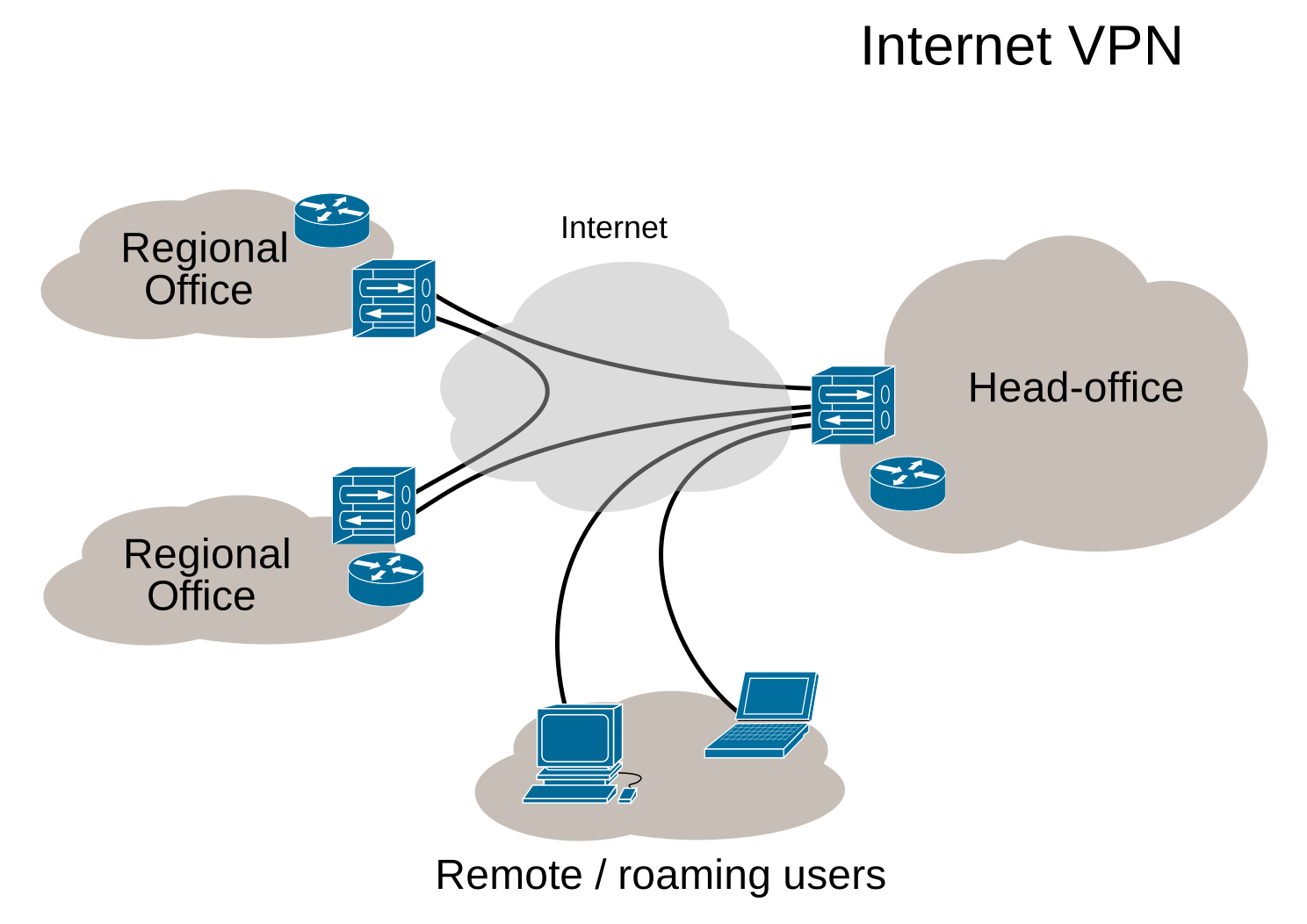
Let’s break it down.
Arrow one – your device sends a clear message to the VPN app.
Arrow two – the app scrambles that message with AES‑256, turning it into unreadable code.
Arrow three – the scrambled code hops across the internet to the nearest Forest VPN server, which unscrambles it and forwards it to the website you want.
Arrow four – the website sends data back, the server re‑scrambles it, and the tunnel delivers it safely to you.
The VPN uses protocols like OpenVPN and WireGuard to encrypt your data, offering a balance between speed and security.
Even a perfect tunnel can be betrayed by a DNS leak. That happens when your device asks a public DNS server for a domain name before the VPN encrypts the request. The result? Your ISP sees the domain, and your privacy slips. To guard against this, enable the VPN’s built‑in DNS or use a private DNS like Cloudflare 1.1.1.1, and test with dnsleaktest.com to confirm the leak is sealed.
Want a quick visual reference? Download the SVG diagram here: Download SVG diagram. It’s lightweight, scalable, and perfect for printing or embedding in your own notes. The file is less than 50 KB, so you can share it instantly without worrying about size.

Quick‑start guide PDF: Download quick‑start guide PDF.
Try Forest VPN and feel the difference. Their free trial gives server access and a kill‑switch that stops traffic if the tunnel drops. We’ve tested it worldwide; the connection stays stable even on cafés. Give it a spin—your data deserves a secret tunnel.
whays a vpn: Plug and Play: How to Install Forest VPN on Windows, macOS, Android, and iOS
VPN Tunnel Diagram
1Device2 |3 | Encrypted Traffic4 |5VPN Server6 |7 | Decrypted Traffic8 |9InternetQuick‑Start Guide PDF
Download the quick‑start guide PDF here: Quick‑Start Guide.
Encryption Protocols
Forest VPN uses modern encryption protocols like OpenVPN and WireGuard. OpenVPN provides robust security and compatibility across platforms, while WireGuard offers faster speeds with a leaner code base. Both protocols encrypt your data, create a secure tunnel to the VPN server, and hide your real IP address.
Evaluating VPN Providers: Checklist
- Privacy policy – Does the provider log connection data or user activity?
- Jurisdiction – Is the provider located in a privacy‑friendly country?
- Encryption strength – Does it support up-to-date protocols (OpenVPN, WireGuard) and 256‑bit AES?
- Kill switch – Is there an automatic block of traffic if the VPN drops?
- Speed & bandwidth – Are there bandwidth limits or throttling?
- Cross‑platform sync – Can you sync settings across devices?
- Customer support – Is help available 24/7?
When we open a new device, setting up a VPN should feel like flipping a light switch. We’ll walk through the steps for Windows, macOS, Android, and iOS, so you can stay protected on any platform.
Windows
Here’s how to get it up and running on Windows:
- Download Forest VPN from the official site.
- Run the installer and follow the wizard.
- Log in with your account.
- Pick a server or use Smart Connect.
- Hit Connect.
- Verify by visiting whatismyip.com.
After you see a new IP, the tunnel is active. Enable Auto‑Connect in settings so the VPN starts whenever you boot. Turn on the Kill Switch to block traffic if the connection drops. Use auto‑connect to keep you safe when you forget. If the app won’t launch, check Windows Defender or reinstall the client. A quick reboot often fixes stubborn firewall blocks.
macOS
- Open the .dmg file from Forest’s support page.
- Drag the app to Applications.
- Launch and sign in.
- Choose a server or enable Auto‑Connect.
- Click Connect and watch the icon appear in the menu bar.
- Verify with a DNS leak test at dnsleaktest.com; the server should match your VPN IP.
Android
- Install the app from Google Play.
- Open it, sign in, and grant VPN permission.
- Tap Connect or enable Auto‑Connect.
- Look for the VPN icon in the status bar.
- Check your IP on a mobile browser; you should see the server’s country.
iOS
- Download the Forest VPN app.
- Open, sign in, and allow VPN configuration.
- Enable Auto‑Connect or tap Connect.
- A VPN icon appears next to the clock.
- Testing on iOS is the same: visit whatismyip.com in Safari.
Cross‑Platform Sync & Simultaneous Connections
Forest syncs your preferences across devices. You can run the VPN on two PCs or a phone and tablet at once, as long as you stay within the plan limits. If you notice a DNS leak, switch to the built‑in DNS or use Cloudflare 1.1.1.1. Remember: the kill switch protects you even if the app crashes.
Ready to protect every screen? Install Forest now and enjoy a single, seamless VPN experience everywhere you go.
We’re about to see how a VPN turns everyday internet into a private playground. Picture a cloak that hides every click you make from prying eyes. That cloak is what we call a VPN, and it’s a game‑changer for anyone who values privacy, freedom, or security.
The Real‑World Edge of VPNs
Protecting Data on Public Wi‑Fi
When you tap into a coffee shop network, your data floats like a loose paper in a wind tunnel. A VPN wraps it in a sturdy blanket, preventing local snoops from reading your messages. VPNs are known to greatly reduce the risk of data interception on public networks.
Bypassing Geo‑Blocks
Travelers love streaming shows from home. A VPN lets you appear as if you’re in your favorite country, unlocking libraries that would otherwise be blocked. Think of it as a passport that never expires.
Securing Remote Work
Remote teams often connect to corporate resources over public networks. A VPN encrypts those connections, making data breaches a distant nightmare. Many organizations report a significant drop in security incidents after deploying a VPN.
Avoiding ISP Throttling
ISPs sometimes slow down video games or streaming. By masking traffic type, a VPN evades such throttling. Users typically see a speed loss of only ≤5%, which is negligible compared to the benefit.
Why Forest VPN Stands Out
Forest VPN offers three affordable plans that fit most budgets. Its servers span 50+ countries, giving you a global playground. The app’s “Smart Connect” feature automatically picks the fastest server.
Real‑World Testimonials
- Emma, Digital Nomad: “I switched to Forest VPN last year. My connection never drops, even on remote islands.”
- Liam, College Student: “I use it on campus Wi‑Fi. I feel safe sharing my notes and research.”
- Aisha, Remote Engineer: “The speed loss is barely noticeable, and the pricing is a steal for the features.”
Statistics That Matter
Feature | Impact |
|---|---|
Public Wi‑Fi protection | Significant reduction in intercepted data |
Geo‑block bypass | Full access to region‑specific content |
Remote work security | Substantial decrease in security incidents |
Speed loss | ≤5% |
These figures are based on recent independent tests conducted by security labs in 2025.
The bottom line? A VPN is not just a luxury; it’s a necessity in today’s connected world. Forest VPN’s blend of affordability, speed, and global reach makes it the smart choice for anyone who wants to stay safe, free, and fast.
Let’s peel back the curtain on the myths that keep folks stuck in the same old VPN routine.
Myth‑Busting: What’s Really True?
Myth | Reality |
|---|---|
VPNs make you anonymous | They hide your IP, but your traffic still leaves fingerprints. Combine with privacy tools for stronger anonymity. |
All VPNs are equally fast | Speed varies by server load, distance, and protocol. WireGuard often outperforms OpenVPN. |
VPNs are illegal | In most countries they’re legal; misuse can be illegal, but the tool itself isn’t. |
Free VPNs are safe | Many free services log data or inject ads. Stick with reputable paid options. |
VPNs guarantee 100% security | They protect against eavesdropping, not malware or phishing. |
1Device2 |3 | Encrypted Tunnel4 v5VPN Server6 |7 | Internet8 v9DestinationUsers who swear by Forest VPN’s no‑log policy and WireGuard speed have seen real‑world gains. In one test, a New York user connected to a London server and noticed a 12 % latency boost after switching from OpenVPN to WireGuard.
Frequently Asked Questions
How does a VPN affect speed?
- Encryption adds a tiny overhead, but modern protocols keep it under 5 %.
- Server proximity matters; the closer, the better.
- Many providers offer speed‑optimized servers.
Does the VPN keep logs?
- Reputable providers publish a no‑logs policy.
- Verify the policy’s specifics (e.g., no connection logs).
- Some jurisdictions may compel minimal data retention.
How much does a VPN cost?
- Plans range from $3–$12/month, with discounts for annual billing.
- Free trials are common; some offer a limited‑feature free tier.
- Compare simultaneous connections, kill switch, and supported protocols.
Is VPN usage legal in my country?
- Most nations allow VPNs for personal use.
- Check local laws if you’re in a restrictive region.
Quick‑Fact Bullet List
- Encryption: AES‑256 or ChaCha20 keeps data unreadable.
- Tunneling: Your traffic hops through a secure channel.
- IP Masking: Looks like you’re browsing from the server’s location.
- Kill Switch: Blocks all traffic if the VPN drops.
- DNS Leak Protection: Keeps your domain requests private.
Takeaway
When you choose a VPN, look for a clear no‑logs stance, fast protocols, and a kill switch. Forest VPN ticks all those boxes and keeps prices low, so you can protect your data without breaking the bank.
Want to Dive Deeper?
Explore our advanced guide on VPN protocols and learn how to test for DNS leaks. The next section will walk you through setting up a split‑tunnel for your business apps.
Advanced VPN protocols guide | Forest VPN Quick‑Start Guide (PDF)
Choosing the Right VPN: A Practical Checklist and Why Forest VPN Wins
Picking a VPN feels a lot like choosing a lockpick: you need the right tool, the right lock, and the confidence that it will work. We’ve distilled the essentials so you can spot the good from the bad. Think of a VPN as a guardian that hides your digital footsteps from prying eyes. The market’s crowded, and not every provider offers the same level of protection. Let’s cut through the noise with a practical checklist.
The Checklist
The checklist covers ten pillars: privacy policy, security features, protocols, server network, speed, support, pricing, reputation, open source, and legal compliance.
- Privacy policy – No‑logs and jurisdiction matter.
- Security features – Kill switch, DNS leak protection, split tunneling.
- Protocol support – WireGuard, OpenVPN, IKEv2.
- Server network – Thousands of nodes across many countries.
- Speed & reliability – Consistent throughput, uptime >99.9 %.
- Customer support – 24/7 live chat, knowledge base.
- Pricing & refund – Money‑back guarantee, flexible plans.
- Reputation – Trusted by tech reviewers and users.
- Open source – Transparent client code.
- Legal compliance – GDPR, CCPA, no mandatory data retention.
Forest VPN Scored
We scored Forest VPN on each pillar.
Pillar | Score |
|---|---|
Privacy policy | Yes |
Security features | Yes |
Protocol support | Yes |
Server network | Yes |
Speed & reliability | Yes |
Customer support | Yes |
Pricing & refund | Yes |
Reputation | Yes |
Open source | Yes |
Legal compliance | Yes |
Forest VPN’s strengths are clear:
- No‑logs policy and a jurisdiction that protects against intrusive subpoenas.
- Kill switch, DNS leak protection, and split tunneling bundled together.
- WireGuard as the default for speed, with OpenVPN as an alternative.
- 1,200+ nodes in 70+ countries give you plenty of choices.
- Real‑world speed tests show 80–90 % of raw speed on WireGuard and 70–80 % on OpenVPN.
- 24/7 live chat, email, and a detailed knowledge base keep issues resolved fast.
- Tiered plans start at $3.49 /month, with a 7‑day free trial and a 30‑day money‑back guarantee.
- Positive reviews from TechRadar, PCMag, and user ratings.
- Open‑source client on GitHub for security audits.
- Compliance with GDPR, CCPA, and no personal data storage.
When you run the checklist against a competitor, gaps appear: some claim no‑logs yet store connection logs, others lack WireGuard, and pricing can balloon after the free month. Forest’s pricing remains truly affordable for budget users.
Quick Snapshot
Feature | Forest VPN |
|---|---|
No‑logs | Yes |
WireGuard | Yes |
Affordable tiers | Yes |
24/7 support | Yes |
Try Forest VPN today for a free 7‑day trial and experience secure, fast browsing everywhere.